Skip to content
  • +27 82 550 9110
  • HOME
  • ABOUT US
  • SERVICES
    • LOGO DESIGN
    • Strategic Marketing
    • Web Design and Hosting
    • Content and Writing
    • Custom PHP Web Development
    • Social Media
    • Search Engine Optimisation
    • Print, Packaging and Promotions
  • CONTACT US
  • HOME
  • ABOUT US
  • SERVICES
    • LOGO DESIGN
    • Strategic Marketing
    • Web Design and Hosting
    • Content and Writing
    • Custom PHP Web Development
    • Social Media
    • Search Engine Optimisation
    • Print, Packaging and Promotions
  • CONTACT US

Admin

⌘K
  • Account Access
    • How to login
    • How to reset your password
  • Stats
    • How to view stats
  • Bookings
    • How to view bookings
    • How to create a new booking?
    • How to Request Payment from the client?
    • How to update the status of a booking
    • How to view booking info
    • How to link an affiliate to a booking
    • How to re-schedule a booking
    • How to view Invoice
  • Adventures
    • How to add categories
    • Booking Calendar
    • How to add an adventure
    • How to manage addons
    • How to manage Adventure Details
    • How to manage assets
    • How to set durations
    • How to update adventure
    • How to update adventure image
    • Manage Availability
  • Affiliates
    • How to Pay Affiliates
    • How to approve affiliates
    • How to view payment history
  • Agents
    • Monthly Recon
    • How to approve agents
    • How to request payments
    • How to view payments received
  • Company Details
    • Overview
    • How to add homepage banner
    • How to add your logo
  • PayFast
    • overview
  • Coupons
    • How to add a coupon
    • How to update a coupon
  • Reviews
    • Overview
  • Email Templates
    • Overview
  • Subscribers
    • Overview
  • Users
    • Overview
  1. Home
  2. Docs
  3. Admin
  4. Bookings
  5. How to view booking info

How to view booking info

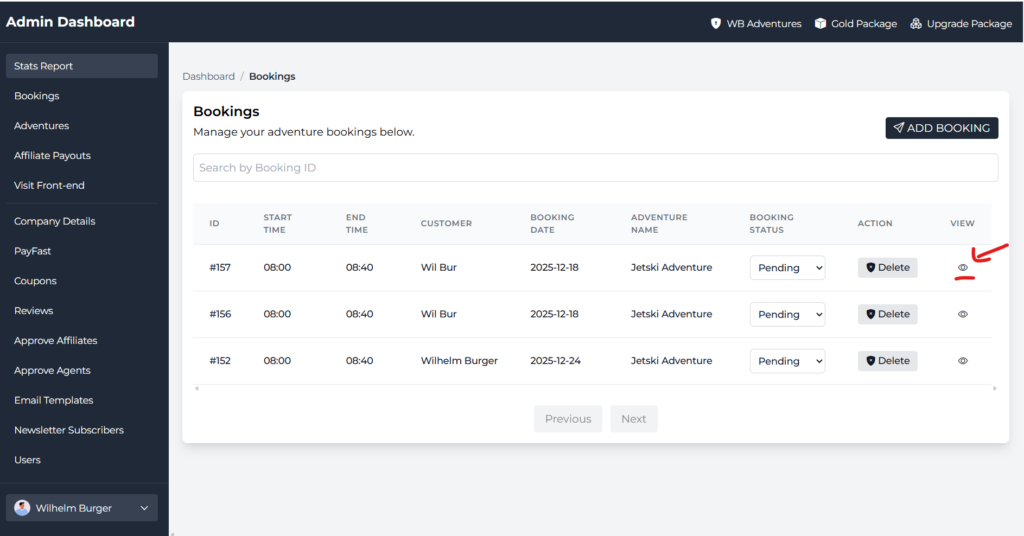
Click the eye icon in the bookins table to view detailed booking info.
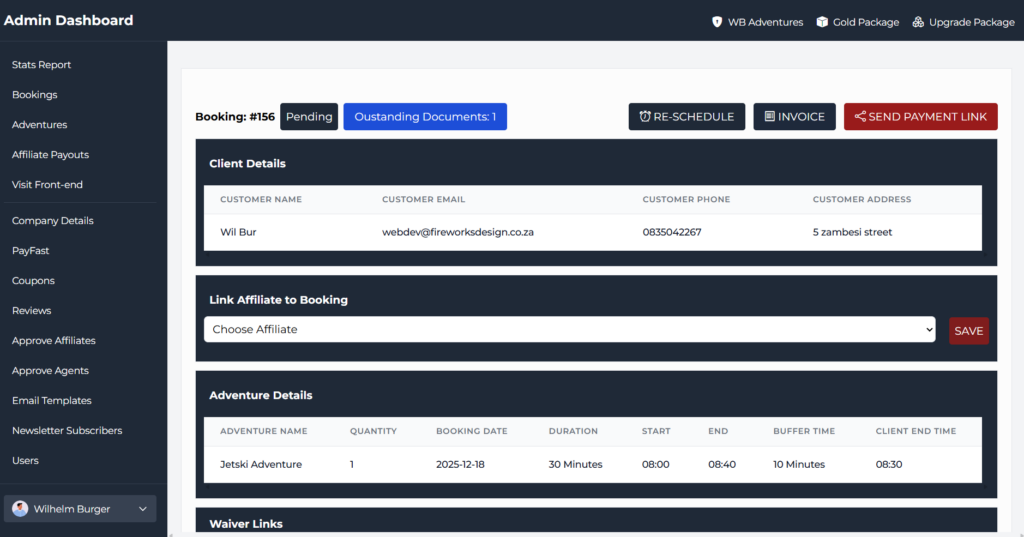
The booking info tab will look like the screenshot below.
Doc navigation

← How to view bookingsHow to link an affiliate to a booking →
Still stuck? How can we help?
Updated on 22 October 2025
Was this article helpful to you? No Yes

How can we help?

Quick Links
  • About Us
  • Contact Us
Legal Stuff
  • Terms & Conditions
  • Privacy Policy
Follow us on social media
Linkedin

We are using cookies to give you the best experience on our website.

You can find out more about which cookies we are using or switch them off in .

Fireworks Creative
Powered by  GDPR Cookie Compliance
Privacy Overview

This website uses cookies so that we can provide you with the best user experience possible. Cookie information is stored in your browser and performs functions such as recognising you when you return to our website and helping our team to understand which sections of the website you find most interesting and useful.

Strictly Necessary Cookies

Strictly Necessary Cookie should be enabled at all times so that we can save your preferences for cookie settings.