
Each adventure has a built-in Booking Calendar. You can view all ‘Approved’ bookings, export to csv and subscribe to Google Calendar and Apple Calendar.

HOW TO RE-SCHEDULE FROM THE CALENDAR?

Click on an item in the calendar. A popup will apear with the booking info and client details.
Click the Re-Schedule Booking button.
HOW TO EXPORT BOOKINGS TO CSV?
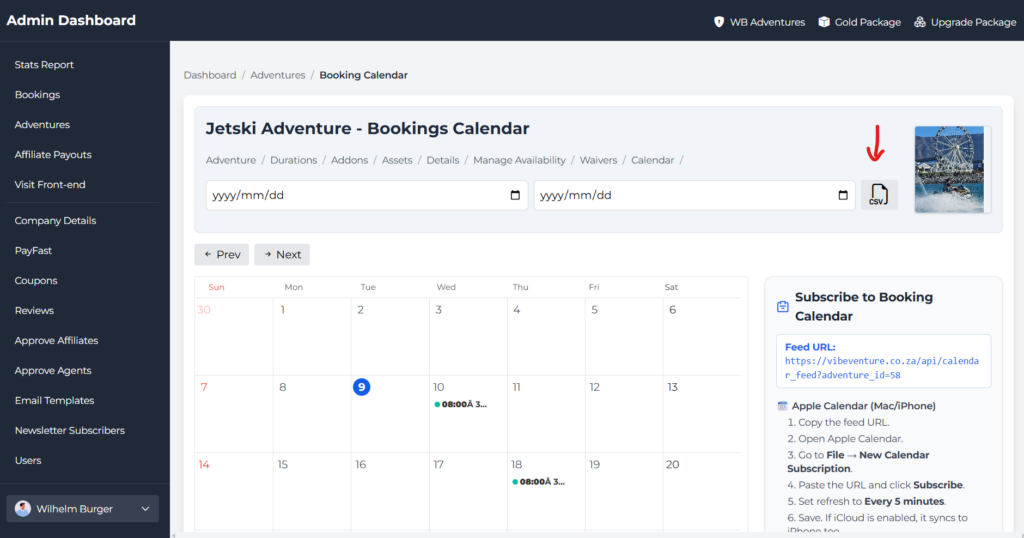
Step 1:
Select a start date and end date.
Step 2:
Click the CSV button.
HOW TO SUBSCRIBE TO GOOGLE CALENDAR?

- Open Google Calendar.
- Click the + next to “Other calendars”.
- Select From URL.
- Paste the feed URL and click Add Calendar.
HOW TO SUBSCRIBE TO APPLE CALENDAR?
- Copy the feed URL.
- Open Apple Calendar.
- Go to File → New Calendar Subscription.
- Paste the URL and click Subscribe.
- Set refresh to Every 5 minutes.
- Save. If iCloud is enabled, it syncs to iPhone too.