
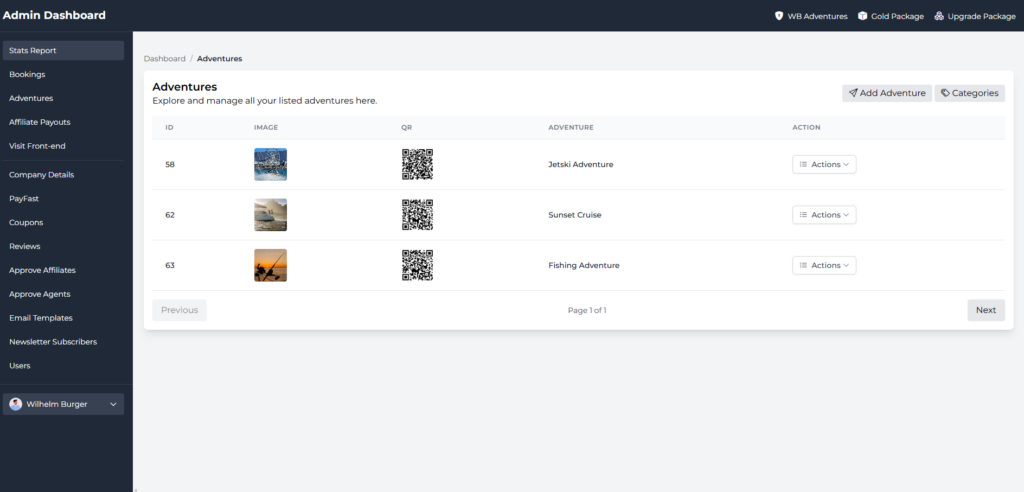
Step 1: Click Adventures

Step 2:
Click Add Adventure
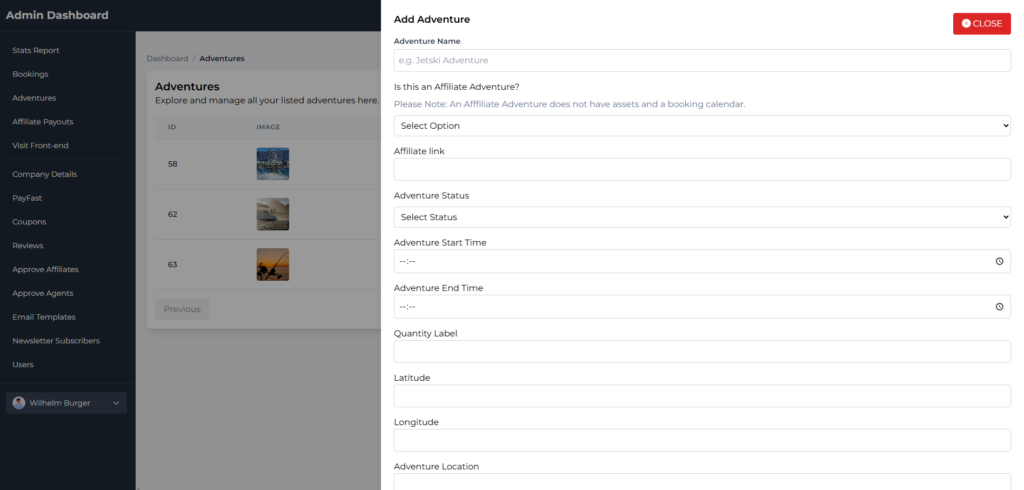
Step 3:
Enter the fields and save.
Please view the fields below.
Fields:
- Adventure Name
- Is this an affiliate adventure? (Set this to yes, if using affiliate link)
- Affiliate link (applicable if the above is set to yes)
- Adventure status
- Adventure Start Time
- Adventure End Time
- Quantity Label (Refers to capacity)
- Latitude
- Longitude
- Adventure location
- Categories
- Is group booking required? (Set this to yes if you want to enforce e.g. 20 pax to book)
Please Note: Adventure start time and end time is used as operating hours. If it is set to 08:00 – 15:00 the application will automatically generate slots between 08:00 and 15:00 with the provided duration’s.
The Quantity Label field dynamically updates on the front-end booking form. This refers to capacity, but the label can be customized to No of Pax, No of Jetskis, No of Boats etc…
